Why set up Facebook conversion tracking?
-
- It provides a powerful way to track the numbers of patients who arrive from Facebook AND the percentage of patients that then book a visit.
- It will enable you to create a conversion funnel so each health system can measure how many patients arrive from Facebook and which ones actually make a reservation.
- Doing so enables you to calculate the conversion rate and the cost per conversion.
- The conversion rate enables you to evaluate your ROI and decide how to allocate your finite advertising budget to Facebook vs other channels, such as Google Ads. For example, if your cost/conversion at Facebook is $10 and Google Ads is $4, you likely should spend your incremental ad budget on Google Ads.
Overview of the Facebook pixel
Facebook provides a tracking pixel, also known as the Facebook universal pixel. It's a piece of code you place on the backend of your website to collect data on user actions so you can measure how effective your ads are.
This pixel consists of two parts: the Base code and the Event code[1]
-
-
-
- “The pixel base code tracks all of the traffic to your site.”
- “Event codes are additional pieces of code you can add under the default pixel code to specific pages of your website that allows you to track certain actions on those pages."
-
-
Why do you need the event code
Many health system’s campaigns do not need the Event code because they simply direct traffic from Facebook to the health system website. For example, maybe you are showing your patients an ad to learn about lung cancer awareness. A potential patient clicks through to a landing page on the health system website that explains and encourages patients to get a lung cancer screening. The patient digital journey largely may end there. You do not need an Event code.
Since ER Express has a specific action you will want patients to take (booking a reservation) you will need an Event code.
For example, imagine two campaigns, each with a budget of $1,000 and each resulting in 100 patients clicking on a Facebook ad for ‘Save my Spot,’ which sends them to the health system landing page. Imagine that each reservation is worth $100 in revenue to the health system.
-
-
- Campaign A results in 30 patients booking a reservation. You spent $1,000 and got $3,000 (30 patients x $100 / patient).
- Campaign B results in 5 patients booking a reservation. You spent $1,000 and got $500 (5 patients x $100 / patient).
-
Without the Event code, you would not know which campaign is actually more successful.
How to add code to the health system website and to the ER Express booking widget
We recommend that you use Google Tag Manager (GTM) to add the pixel to the health system website and to the ER Express booking widget (GTM agnostically tracks any kind of conversion pixel).
-
-
- We insert a ViewContent Event that captures the facilityName for each attempt.
- The facilityName allows you to attribute both attempts and conversions to each facility so you can see variation – for example, if hospital (or clinic) A has a higher conversion vs. hospital B, then you should allocate more spending to campaigns in the ZIP codes around hospital A.
-
Event-based conversions
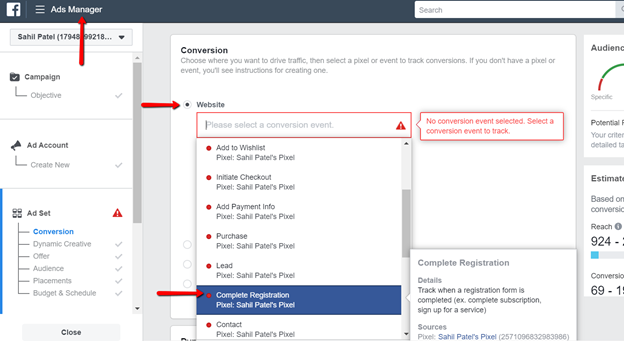
Most campaigns can use Facebook’s standard events. Facebook custom events offer more flexibility but also require more work to implement. We highly recommend using a Facebook Parameter - specifically CompleteRegistration.
More here:
Table 1: Summary of Steps and Who Will Do Them
| Step | Resources needed | Health system / agency | ER Express |
|---|---|---|---|
| Create your Facebook pixel base code | Ads Manager > Events Manager | ✔ | |
| Create your Facebook pixel event code | Ads Manager > Events Manager | ✔ | |
| Install the FB Pixel Helper Chrome extension in your browser | FB Pixel Helper extension | ✔ | ✔ |
| Set up the Facebook Conversion Event | Facebook Ad Manager | ✔ | |
| Load the base code in the health system website | Health system (or ad agency) GTM container | ✔ | |
| Load the pixel base code to the reservation form iframe | ER Express GTM container | ✔ | |
| Load the pixel event code to the reservation form iframe | ER Express GTM container | ✔ |
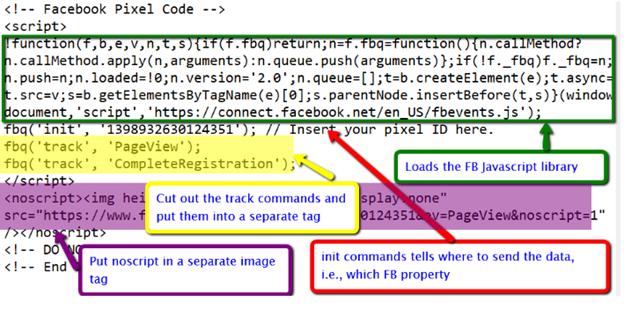
Anatomy of the Facebook pixel
How to implement
Before you get started, here is what the health system marketing dept / marketing agency needs to do:
-
- Create a CompleteRegistration conversion event. Here's how to do it.
- Send ER Express the Facebook property ID
- Have access to the health system (or agency’s) Google Tag Manager (to implement cross-domain tracking) if the customer has not previously implemented cross-domain tracking
What the health system will get
-
- How many patients opened the reservation form after coming from Facebook
- How many patients submitted a reservation after coming from Facebook
- Attribution to Facebook via cross-domain tracking
Next, implement cross domain tracking in the health system GTM container AND the ER Express GTM container
-
- Part 1: Implement Cross-Domain Tracking in the ER Express GTM Container (ER Express can do this ahead of time)
- Part 2: Implement Cross Domain Tracking in the Health System (or its Ad Agency) GTM Container (click here to see our cross-domain tracking guide, or we can walk you through it)
Then, implement the Facebook base code in the ER Express GTM container
The base code tracks the attempt (i.e., the denominator in your conversion funnel).
ER Express will create:
-
- A custom HTML tag that loads the Javascript library and the init command, which identifies which Facebook property will receive data
- A custom HTML tag that sends the Pageview
Finally, implement the conversion event in the ER Express GTM container
ER Express will create:
-
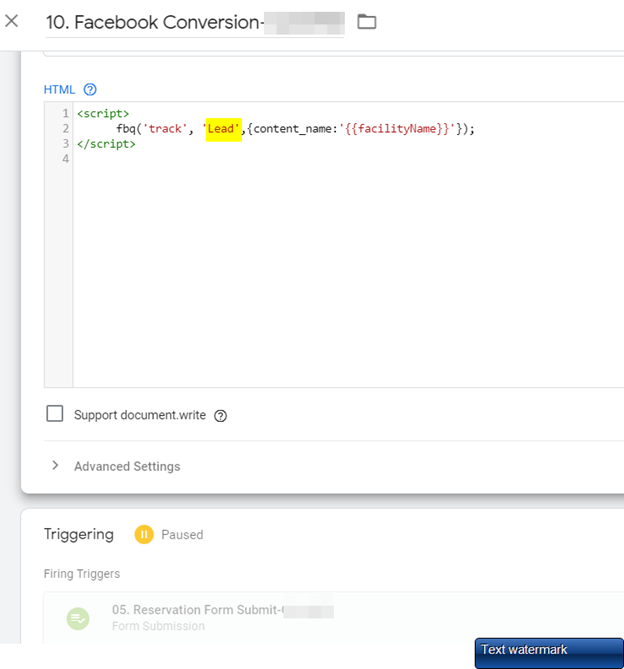
- A custom HTML tag for the conversion, which equates to an Event – either a ‘CompleteRegistration’ (recommended) or ‘Lead’ -- in Facebook
- A trigger for when the patient submits a reservation based on clientName (or facilityName); and for some customers, also based on the Campaign ID
Facebook screenshots
Figure 1: Create an Ad - choose the Conversion Event - we recommend choosing CompleteRegistration
GTM screenshots
Figure 2: Example of the attempt event in GTM
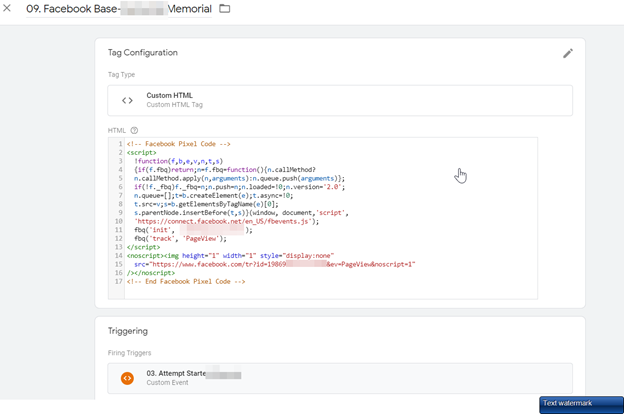
Figure 3: Example: Conversion event (with facility-specific variables) use the CompleteRegistration event in GTM
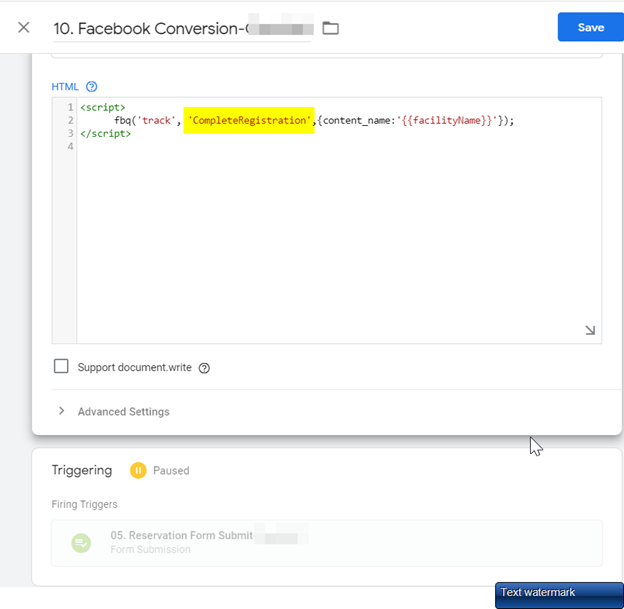
Figure 4: Example Conversion event using the Lead event in GTM
Useful links
-
- https://adespresso.com/blog/facebook-pixel/
- https://www.socialmediaexaminer.com/facebook-pixel-install-use-guide-for-marketers/
- https://blog.hootsuite.com/facebook-pixel/
- https://developers.facebook.com/docs/facebook-pixel/implementation/conversion-tracking/
- https://developers.facebook.com/docs/facebook-pixel/implementation#base-code
- https://developers.facebook.com/docs/facebook-pixel/support/pixel-helper
[1] Source: https://www.socialmediaexaminer.com/facebook-pixel-install-use-guide-for-marketers/